Lastest Articles

Showing posts with label PC Hardware. Show all posts

Thursday, November 7, 2013

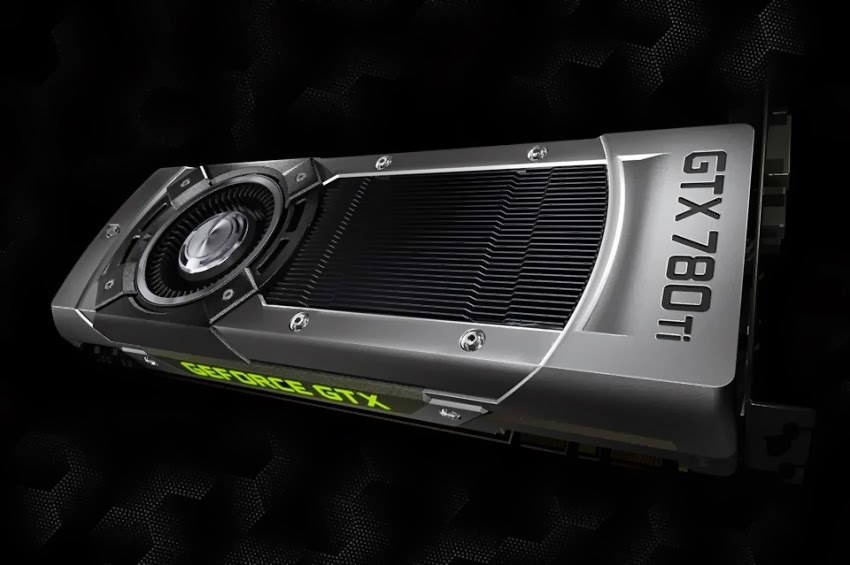
Nvidia GeForce GTX 780 Ti review

0 comments
GTX-780-Ti-610x346

Well, it’s been a busy month for graphics card releases and we’re only seven days into November, but then we always knew Nvidia would be waiting for AMD to release it’s top end cards before issuing their own response, and here it is: the Nvidia GeForce GTX 780 Ti.
And as you would expect, it’s now the fastest graphics card on the planet. But we’re not just talking about taking the single-GPU crown either, the GTX 780 Ti can actually go much faster than the Radeon HD 7990, let alone either the GTX Titan or Radeon R9 290X.
Nvidia have had to bring out their biggest guns for this battle. The original GTX Titan was a bit of shock and awe in order to topple AMD’s Radeon HD 7970 GHz edition from the top of the benchmark tree, the GTX 780 Ti goes even further. Not even Nvidia’s pro graphics card range has used the GPU behemoth inside this card.

Perhaps AMD ought to take this as a bit of a compliment though. Nvidia hasn’t left anything in the tank here, this card represents every bit of power they’ve managed to pull out of the Kepler architecture. Like the GTX 780 and the GTX Titan before it, the GTX 780 Ti is using the GK 110 GPU Nvidia have previously reserved for their professional Tesla graphics card range. It’s a massive, powerful GPU at 533mm2 with over seven billion transistors - the GK 104 used in the original GTX 680 by comparison is relatively svelte at under 300mm2 with half the transistor count.
The Titan used the same chip as the top Tesla K20X card, with 2,688 CUDA cores making it one of the quickest single GPU cards around at the time. That still wasn’t, however, the full-fat GK 110 chip. Both Titan and K20X sport fourteen of the Kepler architecture’s streaming microprocessor (SMX) modules - each with 192 CUDA cores - to make up that 2,688 core count. The full chip though comes out of the fabs with fifteen SMX and some 2,880 cores. Because of the difficulty getting fully functional yields out of the silicon wafers at the top spec the decision was taken to go forward with fourteen. This allowed for chips without the full fifteen functional SMX modules to still make the grade.

But now because of the serious competition from AMD’s Hawaii GPU, Nvidia have had to bring out the big guns. Because the production process is now far more mature than it was a year or so ago I expect the yields on the top chips are much better than they were originally - they’re going to have to be otherwise Nvidia might be taking a bit of a hit bringing the GTX 780 Ti out at this  price.

GTX-780-Ti-fronty-610x346 Send all the cores, ALL THE CORES!

Quick chips
What does all that mean for gaming performance then? It means the GTX 780 Ti is faster than AMD’s finest, that’s what. But not by much, if I’m honest. In the synthetic benchmark of Heaven 4.0 it shows Nvidia’s top card has the definitive edge when it comes to raw performance, but in-game - Bioshock Infinite aside - the difference isn’t nearly so pronounced.
Indeed, with Company of Heroes 2 even the second-tier Hawaii, the Radeon R9 290, is still faster than this giant of a GPU.

When you think about the fact Nvidia’s latest card is over £200 more expensive than the R9 290 suddenly all those CUDA cores don’t look so impressive. And when you’re only getting a few frames per second on average more than the R9 290X, the extra £100-odd over the top Radeon doesn’t look worth the outlay at all.
I was quite prepared to admit that while the GTX 780 Ti was indeed the new fastest GPU in the world it was only by such an insignificant amount as to barely be worth bothering about. A good demonstration of speedy Kepler architecture, but not a card I could recommend anyone buy.
Then I started playing around overclocking it. Boy, does this thing shift when you start playing around with the core and memory clocks. And even at the top settings (some 1,254MHz on the GPU if you’re interested) it was still only knocking around 83ºC and with the fans at 67% it only sounded as blowy as the R9 290X itself.
I’ve never seen any card get so close to hitting 50FPS in Heaven’s system-taxing benchmark at 2560x1600, especially not with the minimum frame rate topping 20FPS either. In my experience of basic GPU overclocking, whether DIY or factory-overclocked, most cards will net you an extra 10% performance boost at best. The GTX 780 Ti was boosting gaming frame rates by 16% at the very least, sometimes as high as 23%.
These are important speed bumps when you’re gaming at high resolutions, which is where you want to be when you’re spending £560 / $700 on a graphics card. If you’re plugging this into a 1080p screen only then you’re a mad person.


GTX-780-Ti-top-610x346 To really see the best of the GTX 780 Ti you need to overclock Must-have?

It’s still not got the must-have price/performance metrics of the impressive Radeon R9 290 though. That card is still an absolute bargain for the gaming speeds you can get out of it. And while the GTX 780 Ti at its top overclock does pull away, sometimes quite significantly, from the second-tier Radeon it’s still tough to argue that the extra performance is really worth the extra couple hundred you’ve got to spend on the GeForce card.
For some people it will be though. If you want the absolute best, quickest graphics card on the market right now, and one that still wont burn a hole in the side of your chassis, or deafen you at full speed, then Nvidia have got the card for you. At £560 / $700 it is a premium-priced GPU, but when you consider the GTX Titan is still selling for much, much more, it’s not actually that bad, value-wise. Fingers crossed Nvidia have sorted out the chip yields for GK 110 chips with the full fifteen SMX modules, because I’m pretty confident they could sell an awful lot of these cards. I guess we’ll see what stock levels are like over the next few days.
Benchmarks
DirectX 11 synthetic performance
Heaven 4.0 - Avg. FPS (min): higher is better
GeForce GTX 780 Ti - 40.6 (18.9)
Radeon R9 290X - 33.7 (17.4)
GeForce GTX Titan - 37.0 (18.2)
Radeon R9 290 - 31.2 (16.7)

DirectX 11 gaming performance
Bioshock Infinite - Avg. FPS (min): higher is better
GeForce GTX 780 Ti - 68 (15)
Radeon R9 290X - 57 (16)
GeForce GTX Titan - 60 (11)
Radeon R9 290 - 55 (16)

Company of Heroes 2 - Avg. FPS (min): higher is better
GeForce GTX 780 Ti - 25 (12)
Radeon R9 290X - 29 (15)
GeForce GTX Titan - 25 (12)
Radeon R9 290 - 27 (14)

GRID 2 - Avg. FPS (min): higher is better
GeForce GTX 780 Ti - 86 (69)
Radeon R9 290X - 86 (68)
GeForce GTX Titan - 77 (61)
Radeon R9 290 - 77 (62)

Total War: Rome II - Avg. FPS (min): higher is better
GeForce GTX 780 Ti - 37 (12)
Radeon R9 290X - 36 (13)
GeForce GTX Titan - 33 (12)
Radeon R9 290 - 34 (11)

Metro: Last Light - Avg. FPS (min): higher is better
GeForce GTX 780 Ti - 28 (14)
Radeon R9 290X - 26 (13)
GeForce GTX Titan - 24 (13)
Radeon R9 290 - 25 (13)

Overclocking performance
Heaven 4.0 - Avg. FPS (min): higher is better
GeForce GTX 780 Ti - 49.2 (21.5)
Radeon R9 290X - 36.7 (18.5)

Temperature performance
GPU 100% - Degrees Centigrade: lower is better
GeForce GTX 780 Ti - 83
Radeon R9 290X - 95
GeForce GTX Titan - 80
Radeon R9 290 - 93

Peak platform power performance
GPU 100% - Watts: lower is better
GeForce GTX 780 Ti - 340
Radeon R9 290X - 383
GeForce GTX Titan - 300
Radeon R9 290 - 347
more .

Tuesday, October 29, 2013

Call Of Duty: Ghosts Full Weapon List Revealed

0 comments


For those of you whose trigger finger is feeling decidedly itchy, calm your frayed nerves, settle down your deathmatch urges, for Call of Duty: Ghosts will be here for all to enjoy in a matter of days.

In the meantime, the full weapons list has been leaked by a Twitter user, giving us our first full glimpse at what we can expect to spend the next thousand hours of our gaming time with…


One Of Many Leaked Weapon Screenshots From The Banned Twitter Account

Being based upon near-future and fictional events gives the team at Infinity Ward a little bit of leeway to tweak what we’ve come to expect from these weapons, so not everything may be exactly as it meets the eye.

Of particular interest to many is the new Marksmen category and class. This is designed for those who enjoying dealing death from afar but prefer a faster fire rate, a solid entry point into what can be a pretty daunting sniping world.


Assault Rifles
SC-2010
SA0-805
AK-12
FAD
Remington R5
MSBS
Honey Badger
ARX-160

LMGs
Ameli
M27-IAR
LSAT
Chain SAW


SMGs
Bizon
CBJ-MSVector CRB
Vepr
K7
MTAR-X

Shotguns
Bulldog
FP6
MTS-255
Tac 12

Sniper Rifles
USR
L1155
Lynx
VKS

Marksman Rifles
IA2
Mk 14 EBR
MR-28
SVU Dragunov

Call of Duty Ghosts is set to launch on November 5th for PC, Xbox 360, PS3, and Wii U, with next-gen editions launching beside their respective consoles.

Source : game-debate.com
more .

Saturday, October 26, 2013

Meet The Radeon R9-290X

0 comments


PC gamers, rejoice, for the launch of AMD’s latest single GPU flagship has finally arrived! The AMD Radeon R9-290X was officially first teased back at last month's GPU14 event, but not until now have we known the the full details of what to expect from such a device.

It's immediately apparent that this could be a card that stands head and shoulders above the rest of the crowd. The R9 290X represents an incredible value proposition for gamers, combining top notch performance with incredible build quality. So, let's take a look at what we can expect from AMD's flagship card...


Radeon R9 290X Specifications

The Radeon 290X specs pack in a 1000MHz Core Clock, 4GB of GDDR5 memory running at 1250 MHz on a huge 512-bit memory interface, accompanied by a massive collection of 2816 Stream Processors.

It uses a single PCIe X16 slot, one 8-pin and one 6-pin power connector to provide power to the card. The 290X also has two BIOS settings, a physical switch on the card that lets you switch between Quiet Mode and Uber Mode.

Quiet mode caps performance and fan speeds to produce a quieter experience, whereas Uber mode aims for optimal performance, regardless of noise.

However, it may be noted that the difference is minimal between the two modes, often only a difference of a couple of frames per second. Users report that in some instances at lower resolutions, quiet mode outperformed Uber mode by a small margin. But in either preset, we can observe that the 290X is a little to a lot faster than the monstrous GTX 780.

The reference design provides 2 DVI-I connectors, an HDMI port, and one DisplayPort on the mounting bracket. With EyeFinity you can connect 6 displays to a single card, and the R9 series now supports up to 3 HDMI/DVI displays, with the rest being connected via DisplayPort. In order to work the monitors must have the same refresh rate and timings.

GTX 780 vs. R9-290X


For those gaming at 2560x1600 you can’t really go wrong with either card at this point, as both average around 60FPS with all but two titles; Bioshock Infinite and Crysis 3. The 290X takes the lead in these two nonetheless, more specifically the 290X is notably faster than the GTX 780, with the exception of Grid 2, where the difference is too miniscule to be notable.

Now let's view the difference between the two juggernaut cards using the 3dMark Fire Strike benchmarking tools.


We can see that in synthetic benchmarks the 290X also outperforms the GTX 780, now this isn’t particularly notable, as synthetic benchmarks do not exactly translate into real world performance in many cases.

AMD has also released a 4K benchmark so we can see how AMD’s focus on 4K has developed


We can see that nearly every game ran at a comfortable 30FPS or better on Ultra quality, with the exception of the system melting Crysis 3.

Peripherals and Features


The Radeon R9 290X features a revamped OverDrive system in which you can increase the clock through percentages rather than actual clock speed, but the most notable addition is undoubtedly the heat map. Stating the maximum fan speeds and target temperatures, the heat map helps you overclock and obtain the balance between added performance and added heat.

However, on the subject of heat, the card runs at a less than stellar 95 degrees Celsius (203 degrees Fahrenheit). However, AMD has claimed that the card can run at this high temperature safely throughout the card's lifetime, and there is no technical reason to reduce the temperature (with the exception of factory OC’d cards.) AMD has stated those who wish to keep the temperature down should invest in an aftermarket cooler, not exactly the greatest customer service for pre-order customers but nevertheless...


Multi-GPU enthusiasts can bid a fond farewell to CrossFire bridges, since you can run two cards in CFX simply by installing them to the motherboard.


Audiophiles, will be happy to see that True Audio Technology will be included with the R9-290X, this technology lets programmers use Tensilica HiFi EP Audio DSP to process audio without utilizing the processor, it removes the possibility of the CPU bottlenecking the sound processing.


ZeroCore Power makes a reappearance, powering down the GPU when idle; the driver monitors tasks and display content to determine whether or not the GPU needs to process changes on-screen.

As well as this of course the upcoming Mantle API will be implemented in all GCN cards; this update will roll out in December giving a “pedal to the metal experience”.


Source: game-debate


more .

Thursday, October 24, 2013

Intels Unlocked Broadwell CPUs Coming Late Next Year

0 comments


The rumour mill has been in full swing over recent days, with whispers of a potential launch of the next generation of Intel i-series processors.

During a recent quarterly meeting the chip giant revealed that the production of of Broadwell chips had been pushed back due to yield problems with the 14-nm production process. The first Broadwell-powered PCs should still be coming by Summer of next year, but we've potentially got a while to go for a version of the chip that has an unlocked multiplier...

It's immediately apparent in the leaked slides that we have quite a wait on our hands; Broadwell processors will apparently be launched in late 2014, and will be Intel's focus throughout 2015. An entire year without new chips could potentially be hugely damaging to the company, and is a hugely different focus from AMD's twice yearly processor series' releases.

Along with a refreshment of Haswell processors, they will release Broadwell "K" processors. This undoubtedly means that they are processors with unlocked cores designed primarily for overclocking. It also makes it clear that Intel won't be releasing any standard processor, which seems very unlikely especially after the CEO Brian Kranzich's announcement thats Broadwell has been delayed due to a "defect density issue" on chip yields.


Moreover, the slides indicate that these processors won't be fitting into old 8-series LGA 1150 sockets, superseding all the earlier rumors that motherboard upgrades won't be required to install a Broadwell processor. As reports suggest, this change is probably due to the more efficient power management that Broadwell will feature; changes to Intel's power specifications render old boards redundant.

Despite this, the new series of chipset will bring many new advanced features that processors of this era currently lack. This includes Intel Rapid Storage Technology 13, Rapid Storage Technology for PCIe, and manageability and security features.

This delay may comes as bad news for some who've been itching to see what Intel has up its sleeve next. As with previous items, take this with a tiny pinch of salt as the source VR-Zone is not always entirely 'accurate' in this matter.

Source: game-debate
more .

Wednesday, October 23, 2013

NVIDIA’s Outs 331.58 Drivers, Prepares You for Upcoming Big Titles

0 comments


With the end of October we’re going to be seeing the release of a lot of big name titles, and two of the first big ones to kick things off are Batman: Arkham Origins and Battlefield 4.

In preparation of this, Nvidia today released it’s latest Drivers meant to bring optimal performance for these games and more, with them saying results have been seen as high as 13% increase from previous drivers when used on a GTX 770/780 or TItan, using examples like Sniper Elite v2 (13%), Sleeping Dogs (8%), Metro: Last Light (9%), and Dirt: Showdown (11%).

Of course these results can vary based on your own PC build and overall system setup. These Drivers will also be adding support for 4K Surround for those using 4K Displays, and is now starting the beta stages of allowing the Nvidia Shield to stream games via GeForce. The holiday releases will shortly be upon us, make sure you update your driver’s properly and get ready for back to back game releases!


Release Summary
This Game Ready WHQL driver ensures you’ll have the best possible gaming experience in Batman: Arkham Origins and Battlefield 4. GeForce Game Ready drivers also provide performance increases for a variety of different games.

New in GeForce R331 Drivers
Performance Boost – Increases performance by up to 13% for GeForce 400/500/600/700 series GPUs in several PC games vs. GeForce 327.23 WHQL-certified drivers. Results will vary depending on your GPU and system configuration. Here is one example of measured gains:

GeForce GTX 770/780/TITAN:
Up to 11% in Dirt: Showdown
Up to 9% in Metro: Last Light
Up to 8% in Sleeping Dogs
Up to 13% in Sniper Elite V2
SLI Technology
Batman: Arkham Origins – updated profile
Battlefield 4 – updated profile
Shadow Warrior – added DX9 profile
War of the Vikings – added DX11 profile
Dragon Sword – updated DX9 profile
GRID 2 – updated DX11 profile
Euro Truck Simulator 2 – updated profile
Gaming Technology
Civilization 5 – added HBAO+;
SHIELD
Enables GeForce to SHIELD streaming (Beta). Learn more here.
4K Displays
Adds support for 4K Surround

Additional Details

Installs new PhysX System Software 9.13.0725.
Installs HD Audio v1.3.26.4
Installs GeForce Experience v8.3.23.1
Includes support for applications built using CUDA 5.5 or earlier version of the CUDA Toolkit. More information athttp://developer.nvidia.com/cuda-toolkit
Supports OpenGL 4.3 for GeForce 400-series and later GPUs.
Supports DisplayPort 1.2 for GeForce GTX 600 series GPUs.
Supports multiple languages and APIs for GPU computing: CUDA C, CUDA C++, CUDA Fortran, OpenCL, DirectCompute, and Microsoft C++ AMP.
Supports single GPU and NVIDIA SLI technology on DirectX 9, DirectX 10, DirectX 11, and OpenGL, including 3-way SLI, Quad SLI, and SLI support on SLI-certified Intel and AMD motherboards.

Source: NVIDIA
more .

Saturday, October 19, 2013

NVIDIA announces GeForce GTX 780 Ti!

0 comments

NVIDIA has just announced the GeForce GTX 780 Ti, a direct competitor to the R9 290X !

GTX 780 Ti specifications are not yet announced. We will update this post as soon as specifications are confirmed (one way or the other).


All we know for sure is that it’s based on a GK110 and has the same design as GTX 780 and TITAN. This card has either 2496 CUDA cores 2688 or 2880, most likely the first option though since we are just targeting R9 290X here (although there is a general assumption this is Titan re-branded, at a lower price point)

The other option is that it’s actually TITAN with 3GB of video memory.


Jen Hsun Huang revealed that GTX 780 Ti will have a low TDP (6+8-pin power connectors) and it will support 3-way SLI.

This new GeForce card will arrive mid-November. Reviewers will get their samples today so we should learn a lot more in few next hours.

According to TechPowerUP, GTX 780 Ti should replace the GTX 780 at the current pricepoint, meaning GTX 780 should get cheaper now.

Official render:


More pictures from TweakTown:

Source: videocardz.com
more .

Friday, October 18, 2013

GIGABYTE Z87X-OC Review: Overclocking Oriented Orange at $200

0 comments


Last generation saw a new type of product in motherboards: the cheap OC oriented SKU. At $200-250 we had a single option specifically designed for OC. This generation, we have several options around that price point, but the GIGABYTE Z87X-OC which we are reviewing today hits it on the nose, or even with a small discount to $186 from time to time.

The purpose of an overclock oriented motherboard is multi-pronged. One the one hand, at this price point, it provides an outlet for extreme overclockers using sub-zero temperatures to get many of the overclocking features they require. It will have several specific features for this crowd and perhaps even specific hardware – but the BIOS and software are all written with them in mind. The other prong is for Joe Public, who might want a nice overclocked system but still to have all the day-to-day features needed. Joe might not use on-board overclocking buttons or the added hardware, but with a backbone for a daily OC he/she wants something built to withstand.


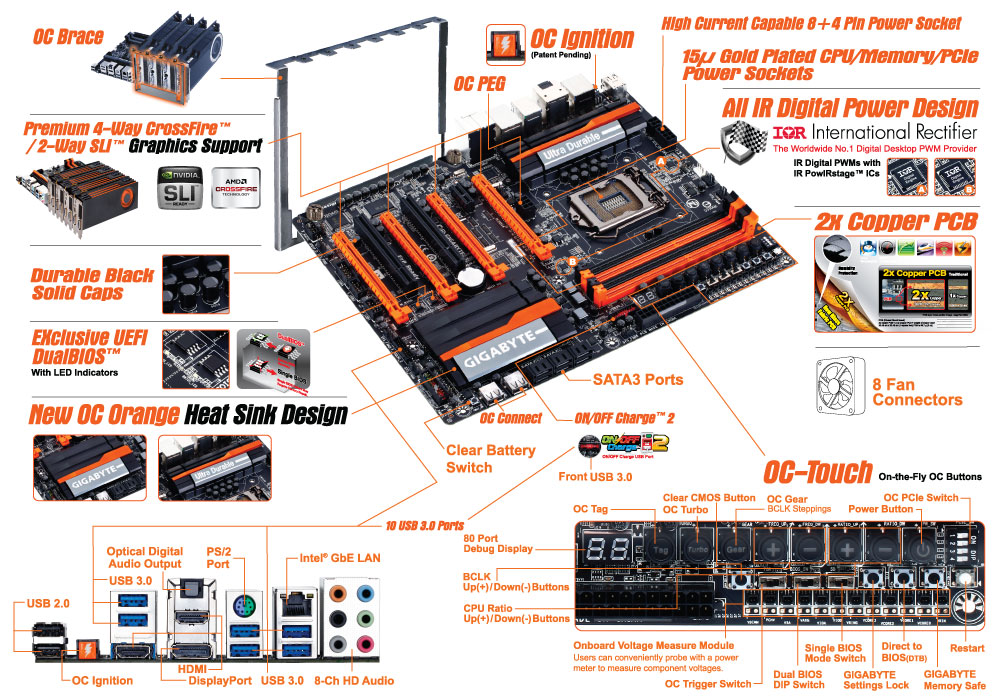
The Z87X-OC is one of two overclocking oriented boards produced by GIGABYTE this generation – the other is the bigger brother, called the Z87X-OC Force. The OC Force is double the price but features four-way SLI (due to a PLX 8747 chip), twice as many power phases (which are not cheap), added SATA/USB controllers and a combination air/water power phase cooler. The Z87X-OC which we are reviewing today could be considered a cut down version of the OC Force, although the Z87X-OC has that price point purpose that proved so popular with Ivy Bridge and Z77 motherboards. It also features some interesting ideas such as the OC Brace and the OC Ignition switch, both unique to GIGABYTE, an extensive array of overclocking buttons (OC Touch) and an interesting placement for USB ports.

GIGABYTE Z87X-OC Overview

It is hard to pin down what exactly I would want in an overclocking motherboard. There are a number of elements that would be beneficial to a daily overclocked system but not an extreme overclocking (sub-zero) setup and vice versa. The trouble with making an overclocking motherboard is that it has to do both – you cannot sell purely to one crowd. Beyond that, it all comes down to potential compromise and how to deal with it.

With the GIGABYTE Z87X-OC, there are a number of features which fit solely into that extreme overclocker crowd: the OC Touch buttons for on-the-fly overclocking, easy voltage monitoring points, PCIe switches, the OC Brace to align graphics cards properly and OC Ignition to allow the chipset (and GPUs/fans) to remain spinning when the system is turned off. Arguably none of these are of use to most daily setups. However we do get OC Connect (the name for the internal USB ports), a dual BIOS system, overclocking oriented power delivery and a PCIe layout suitable for up to four AMD GPUs (or two NVIDIA in SLI), all of which is beneficial to a daily system.


The poignant part of the Z87X-OC is the price. It comes in at $200 for a lot of extreme overclocking oriented features that do not appear on any other motherboard in this price range (or require spending almost double). There are a few cutbacks for that price, namely the audio codec is an ALC892 (rather than ALC898 or ALC1150 at this price point), there are no additional SATA controllers and for some reason only two of the chipset USB 3.0 ports are used. There are two USB 3.0 hubs for another eight USB 3.0 ports, and it seems GIGABYTE went this way to avoid any issues relating to the early chipset revisions and USB 3.0.

In terms of benchmarking results, there is little to separate the Z87X-OC on performance from the expected norm: we get MultiCore Turbo when XMP is enabled to give a full Turbo mode no matter what the load the CPU has. For our daily overclocking we hit the same speeds as other models due to our limited CPU sample, but the process of getting there was rather easy. GIGABYTE is now fully onboard with their new HD BIOS and EasyTune revisions, designed to make adjusting features easier than before.

If we were to suggest modifications, it would be aimed at getting the BIOS to report in 60Hz rather than 30Hz, and that in order to implement the Auto Overclock tuning I would suggest moving the requirement to install Flash. That being said, the auto overclock ended up being very aggressive, causing the system to overheat and de-clock as a result.

The argument can be made for motherboards in this price range that have more features (more SATA 6 Gbps ports, more NICs, WiFi, better Audio), but ultimately GIGABYTE are aiming more for that extreme overclocking crowd that likes to take temperatures below sub-zero. For them, the GIGABYTE Z87X-OC is geared up to take world records and challenge one or two (or three or four).

Visual Inspection

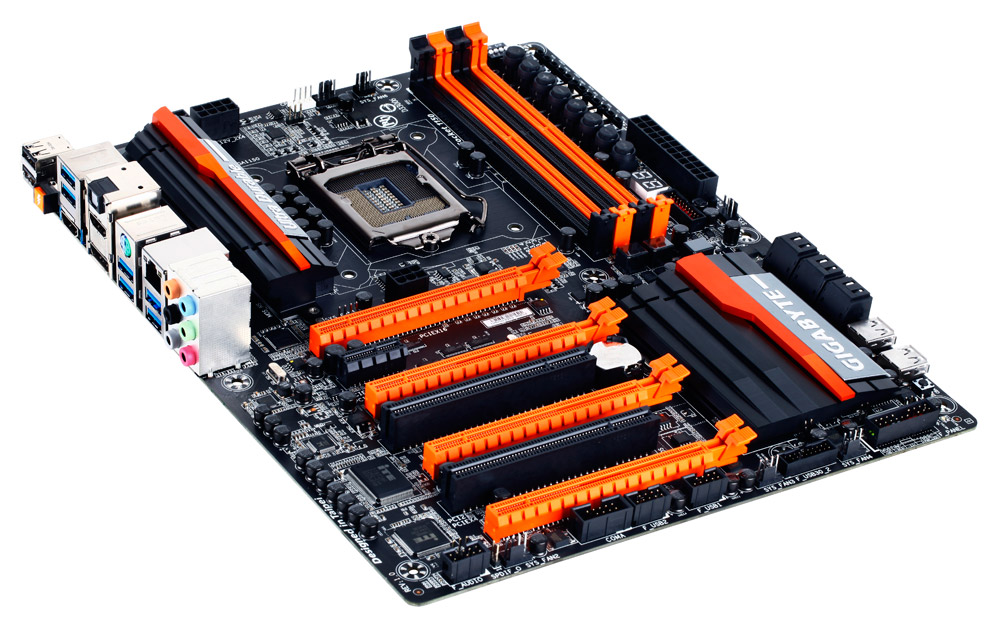
As mentioned, the first element that strikes me when I look at the Z87X-OC is the orange four PCIe slots, followed by the OC Touch buttons on the top right and the OC Connect USB ports next to the SATA connectors. The heatsinks also exhibit GIGABYTE’s new design for Z87.


With this being an OC oriented board, the socket area is designed to be as empty as possible for sub-zero preparations. The VRM cooler is low profile enough to not interfere with large coolers – part of this comes from using the IR3553 40A ICs in the power delivery, which GIGABYTE are keen to point out run very cool. These are interestingly enough paired with 60A chokes, which seems a little odd if the choke has a larger range than the VRM. I asked GIGABYTE’s experts on the matter, and the answer ultimately comes down to sub-zero cooling. For day-to-day use, the power delivery is unlikely to bump past 25% of the peak capability, and while 40A ICs and 40A chokes might offer a higher peak current under extreme cold, at these temperatures electrical noise is also an issue due to lower resistance, and any temperature loss causes that noise. By using a choke that is designed to output less heat when pushed to the limit, and as 60A chokes are often custom made to the buyer’s requirements (so I am told), it can reduce the potential for noise, albeit under sub-zero cooling only. For the 60A IR3550 ICs, due to their cost, users would require the Z87X-OC Force, the upgraded model.

In order to boost the power delivery to the socket for extreme overclockers there is an 8-pin and an additional 4-pin CPU power connector, whereas in this price bracket we usually get a single 8-pin. Fan headers are abundant, with the Z87X-OC having eight in total and five being in the socket area. At the top we have a 4-pin CPU_Fan and a 4-pin CPU_OPT, the latter being designed for AIO liquid cooling setups. To the right of this is a 3-pin, below the VRMs is a 4-pin and below the 24-pin ATX connector is another 3-pin for the socket area. The final three headers are on the bottom of the board, all 4-pin.

The memory slots use a single sided latch mechanism, which I happen to like although I have seen forum issues where users do not push the memory fully down or miss the click of ensuring the memory is seated properly. For motherboards like the Z87X-OC that have a PCIe x16 as the first full length slot, I would suggested going with single sided latches otherwise a GPU can get in the way when trying to properly adjust memory.

OC Touch

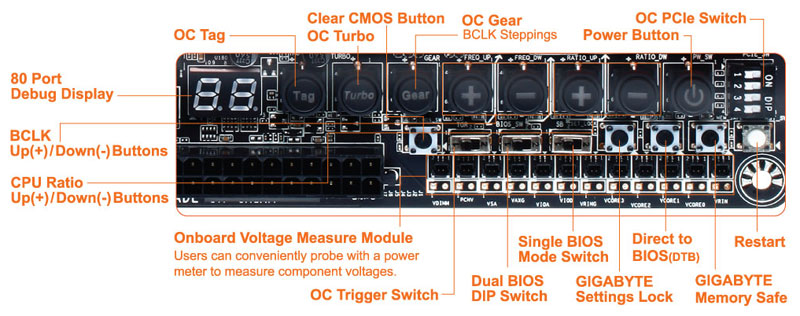
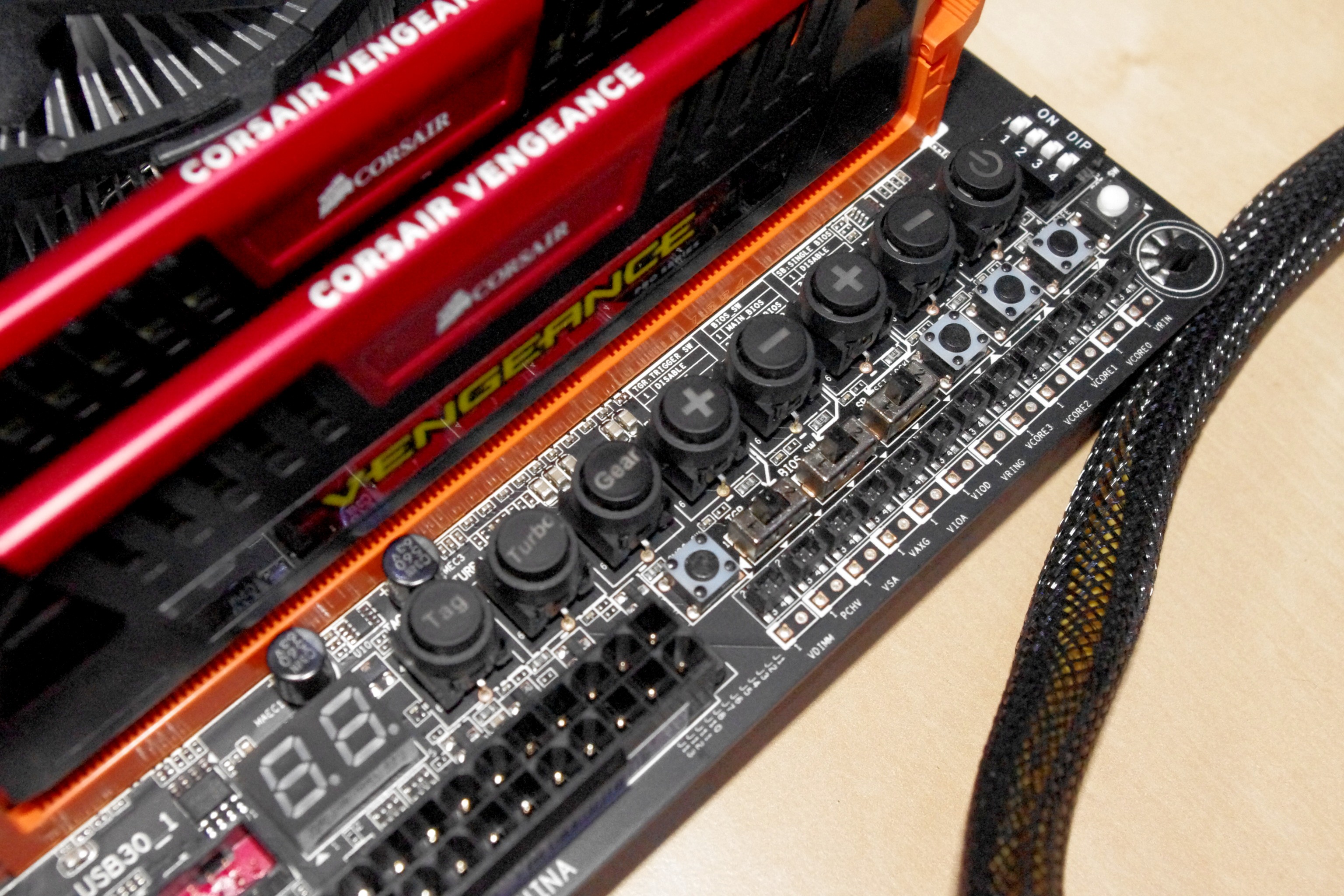
One of the big features of this generation of GIGABYTE overclocking motherboards are the OC Touch buttons, along with voltage read points, PCIe switches and BIOS selection.


With these buttons extreme overclockers can overclock on the fly, switch BIOSes to one that is more suited to a benchmark, drop the memory to stock levels without adjusting the rest of the settings, enable/disable PCIe switches to remove instability and for Win8 overclocking go straight to BIOS while still having a fast boot sequence. So while these buttons are great, the issue I had was that unless you knew for sure which button was which, it was a little frustrating to bend over the board and try and read the PCB writing to discern one option from the next. GIGABYTE has made a large effort to ensure a lot of writing on the PCB to make it easier, although due to space limitations there are a few arrows pointing to options further away. Perhaps some sort of plastic overlay might be easier?


Below the OC Touch is our Intel USB 3.0 header, shaded red, and then the SATA ports. GIGABYTE are using six from the PCH, all SATA 6 Gbps, leaving the two FlexIO ports optional with PCIe 2.0 as the PCIe option. Below the SATA ports are two USB 2.0 headers, part of the OC Connect feature, which are for overclockers to plug in USB keys / peripherals. If an overclocker has their setup to their left, in order to plug in a USB they have to stretch over to the rear IO in order to do so, which could cause something to move that should not. There is another use for these USB ports – software that requires a USB dongle license (such as Cubase) can be placed here inside the case so others cannot remove it / think it is a USB stick.


The chipset heatsink exhibits GIGABYTE’s new heatsink design, this time in orange, and it grooved with a few fins to help with heat dissipation. Underneath this is the usual array of bottom IO headers – from left to right: front panel audio, 4-pin fan, COM, USB 2.0, USB 2.0, 4-pin fan, USB 3.0, 4-pin fan, and finally the front panel header.

In terms of the PCIe layout, GIGABYTE has gone with the full complement possible from Z87 without using a PCIe switch – x8/x4/x4. This means the first slot is PCIe x16, and the third slot is for the next x8 card. Between the two is the x4 causing an x8/x4/x4. The fourth PCIe slot on the bottom of the board is a PCIe 2.0 x4 from the PCH, meaning we have an “x8/x4/x4 + x4” setup. For gaming:

- CrossFire has no PCIe lane restrictions, and can run quad-CFX at x8/x4/x4 + x4
- SLI requires an x8 from at least the CPU or a PLX, so we are limited to two-way SLI

One of the criticisms that come from motherboards with an x8/x4/x4 layout is that when using two-way SLI, nothing can be used in the third slot otherwise it disables SLI (by shifting the second GPU down to x4). In GIGABYTE’s layout on the Z87X-OC, users can have two-way SLI using PCIe lanes from the CPU and still use the x4 from the PCH for sound/RAID/other PCIe cards.


The final element of the visual inspection is the Rear IO panel, which throws up a couple of surprises of its own. The first is the big orange button, known as the OC Ignition button. This button, when depressed, ensures that the chipset is still powered when the machine is switched off but still plugged in. This allows the fans connected to the headers as well as GPU fans to keep spinning, letting the system cool down / remove moisture in a sub-zero setup between boots.

(There has been a small issue raised regarding a couple of Corsair power supplies and OC Ignition. With the early revision (2012, wk34) AX760i/AX860i PSUs there is a signal compatibility issue with OC Ignition, which can cause the system to not power on or in rare cases shutdown without warning. Neither GIGABYTE nor Corsair are officially commenting on the subject, but a fix is available which GIGABYTE will repair through RMA and GIGABYTE is implementing on new batches of motherboards. This would suggest that it is a GIGABYTE fault, limited to these power supplies, but other boards have exhibited similar behavior with these power supplies. For fuller details, this thread has information.)

Aside from OC Ignition, the rear IO is a little different by supporting two HDMI ports (both outputs). By switching from a DVI to a HDMI saves space on the rear IO, making sense when fitting in custom features like OC ignition. Also of note is the audio codec – a Realtek ALC892. At this price bracket we have ALC1150 enabled motherboards, or even ALC898, which are both shown to have higher dynamic range and marginally better distortion numbers. The reason is purely cost for the OC features, where extreme overclockers are not fussed about the codec. Audiophiles notice the difference, and GIGABYTE likes to direct these users to the G1 range of motherboards built with audio in mind.

OC Brace

The final hardware feature which is not on the motherboard directly is the OC Brace included in the box. This addition is designed to be put on a motherboard to allow overclockers to set up their GPUs properly with spacing, rather than having them all fall into each other (useful if you’re managing 3kg copper pots). The OC Brace went through several rounds of design in order to make it able to be quickly fitted, have the back place of the GPU in the right location and for nothing to scratch each other. I used it while testing in my review, and I would happily use it again. I found it a little annoying to put on the motherboard (I kept dropping screws) but once applied it did make it easy to keep GPUs correctly spaced. The only downside is for users that already have a bench table (DimasTech, CoolerMaster etc.) that already have this functionality, or already have something in place of the mounting holes.


Board FeaturesGIGABYTE Z87X-OC
Price Link
Size ATX
CPU Interface LGA-1150
Chipset Intel Z87
Memory Slots Four DDR3 DIMM slots supporting up to 32 GB
Up to Dual Channel, 1333-3000 MHz
Video Outputs 2 x HDMI
DisplayPort
Onboard LAN Intel
Onboard Audio Realtek ALC892
Expansion Slots 3 x PCIe 3.0 x16 (x16, x8/x8 or x8/x4/x4)
1 x PCIe 2.0 x4 (from PCH)
1 x PCIe 2.0 x1
2 x PCI
Onboard SATA/RAID 6 x SATA 6 Gbps (PCH), RAID 0, 1, 5, 10
USB 3.0 2 x USB 3.0 (PCH) [1 header]
8 x USB 3.0 (Renesas uPD720210) [6 back panel, 1 header]
Flex IO
x+y+z = 18
SATA 6 Gbps 6
USB 3.0 2 (not using two others)
PCIe 2.0 8

Onboard 6 x SATA 6 Gbps
2 x USB 3.0 Headers
2 x USB 2.0 Headers
2 x USB 2.0 Ports
8 x Fan Headers
1 x COM Header
OC Touch
Power/Reset Buttons
Power Connectors 1 x 24-pin ATX Connector
1 x 8-pin CPU Connector
1 x 4-pin CPU Connector
1 x 6-pin PCIe Connector
Fan Headers 2 x CPU (4-pin)
6 x SYS (3 x 4-pin, 3 x 3-pin)
IO Panel 2 x USB 2.0
6 x USB 3.0
OC Ignition
2 x HDMI
DisplayPort
Intel NIC
Audio Jacks (Realtek ALC892)
Warranty Period 3 Years
Product Page Link


As the Z87X-OC is all about offering overclock options to those that will use them, there has been a compromise or two when it comes to the hardware options. Primarily it is to do with the audio codec, being only the ALC892, as well as the lack of additional SATA controllers. The Z87X-OC uses two USB 3.0 Renesas hubs rather than all the USB 3.0 ports from the PCH – reasons seems to point towards that these hubs do not have the USB 3.0 issue of B2 PCH models.

Despite this, overclock options are the main point of the Z87X-OC: OC Touch, OC Brace, OC Connect and the IR3553s. GIGABYTE also like to point out their black caps, part of the Ultra Durable 5 PLUS ethos, rated at 105C for 10000 hours. There is extra gold on all the connectors on board (socket, power connectors, PCIe slots, DRAM slots), good for overclockers that are constantly changing hardware.

Source: anandtech.com
more .

Thursday, October 17, 2013

First Official AMD Radeon R9 290X Benchmarks

0 comments
We're in the process of benchmarking AMD's upcoming Radeon R9 290X flagship. But before the embargo expires, the company gave us the go-ahead to publish a couple of numbers from tests we've already run.

We’re cranking away in the lab, benchmarking AMD’s Radeon R9 290X graphics card. Typically, that means you wouldn’t hear a peep from me until launch day.


Presumably as a counter to Nvidia’s press event, which is currently happening in Montreal, however, the company is giving me the go-ahead to publish a couple of my results a bit early.

AMD was very specific that the only numbers it’s approving come from BioShock Infinite and Tomb Raider. We’re only able to show you R9 290X compared to GeForce GTX 780, and only at 3840x2160. But despite those limitations, these numbers were run in our lab, on our own equipment.


We could have dialed this one back a bit, but because Tomb Raider moves a little slower, and because this benchmark sequence is both very demanding and highly repeatable, I wasn’t bothered by the R9 290X’s performance, but was impressed by what I was seeing at Ultra HD.


I backed off a bit in BioShock Infinite, although the Very High detail preset still looks great. As you can see, Radeon R9 290X has little trouble posting higher average frame rates yet again. It’s worth noting that these are Fraps-based numbers—in single-GPU configurations, the results from Fraps and FCAT track closely anyway.

There’s not much more I can say at this point, except that I have several cards tested at 3840x2160, and R9 290X doesn’t just do well against the GeForce GTX 780…


more .

Steam Machine prototype: laying out Valve’s slimline machine

0 comments
 Looking again at the specifications for Valve’s own prototype for their Steam Machine one thing jumped out of the page at me – this powerful, fully specced gaming PC isn’t even going to be 3-inches high. That’s slimmer than the XBone, and there’s a GTX Titan inside. I sat down with a ruler, a mini-ITX motherboard and a Titan to try and visualise the way the Steam Machine is likely to be laid out inside, and with a little imagination you can see what a lovely, sleek little device this could turn out to be.


Those Steam Machine specs in full…

The 300 prototype units will ship with the following components:
CPU: some units with NVidia Titan, some GTX780, some GTX760, and some GTX660
CPU: some boxes with Intel i7-4770, some i5-4570, and some i3
RAM: 16GB DDR3-1600 (CPU), 3GB GDDR5 (GPU)
Storage: 1TB/8GB Hybrid SSHD
Power Supply: Internal 450w 80Plus Gold
Dimensions: approx. 12 x 12.4 x 2.9 in high

I put together a few components to see if those slimline specs are doable, and they are. My main concern though is the cooling. I’ve checked out some impressive low profile coolers recently and Valve isn’t using the overclockable K-series processors from Intel so I’m not too worried about the CPU. The graphics card is another matter. Ensuring this thing has adequate airflow to stop the card needing to spool up its fans to max, the instant you start gaming, is likely to be quite a challenge.

The final prototype is supposedly only a few centimetres taller than the component layout here.
I’m also intrigued as to how loud this prototype is going to be. With small fans in the PSU, CPU cooler and graphics card – having to work pretty hard in all likelihood – it could end up being a rather noisy beast. It’s all very well having a machine small enough to fit under your TV, but if it drowns out everything that’s happening on-screen it’s a bit of a worry.


Valve will have thought of these issues too, of course. It’ll be interesting to see what they have in place to solve them. The fact that this is just the prototype has me very excited for the seriously small form factor chassis that are bound to be copycat-created once the inaugural Steam Machine is out of Valve’s laboratory.

This layout is approximately 12-inches square – I’m guessing that gap will be filled by the PSU and storage
I’ll be doing a lot more investigation into custom Steam boxes and small factor components shortly.

Source: pcgamer.com
more .

AMD Radeon R9 290X Performance Preview: Bioshock Infinite

0 comments
 As something of a counter-event to NVIDIA’s gaming showcase taking place in Montreal, Canada this week, AMD has organized an early, brief reveal of their forthcoming Radeon R9 290X video card. The card won’t be launching until sometime in the future, but for today we’re being allowed to confirm that we have the card and are being allowed to publish a single benchmark: Bioshock Infinite at 3840x2160 (4K).

AMD has purposely kept the public details on the R9 290X sparse so far, so we know little other than that it’s a larger GPU rated for 5 TFLOPS of compute performance, and paired with 4GB of memory for a total memory bandwidth of over 300GB/sec. Like most segments of the consumer electronics industry AMD has been gearing up for 3840x2160 (4K) displays, so the Radeon 290X is AMD’s flagship card geared towards gamers using 3840x2160 or 2560x1440 monitors.

Consequently AMD is seeking to draw attention to their 4K performance with today’s benchmark reveal. AMD named the game, the cards, and the resolution – Bioshock at 4K against the GTX 780 – so this is a very limited subset of our full results. And as with all controlled benchmark releases we’d advise not reading too much into any single benchmark here, as the relative performance of NVIDIA and AMD cards changes with the game being tested, at times rather wildly.


The biggest problem with 4K displays for at least the intermediate future, other than price of course, will be that you’re either going to need a lot of GPU power to drive them or will have to take a quality hit to achieve acceptable performance. Neither the R9 290X nor the GTX 780 are powerful enough to stay above 30fps on Bioshock with everything turned up. For that you will need to drop down to Medium quality, which gets performance past 30fps and up into the 60fps range. The fact that we’re even talking about playing a game at 60fps this high of a resolution – with 2.25 times as many pixels as 2560x1440 – is a big accomplishment right there, it’s just not one that will come without tradeoffs. For little-to-no compromise 4K gaming we’ll undoubtedly need to turn to multiple GPUs and Crossfire/SLI.

Moving on, it’s interesting to note in this case that both cards are essentially tied at Ultra quality, but when we dial down to medium the 290X takes a very decisive 14% lead. At the highest quality settings we should be shader/texture bound due to the significant use of shader effects on Bioshock’s highest quality settings, whereas at lower quality settings at least some of the bottleneck will shift to elements such as ROP throughput, memory bandwidth, and the geometry pipeline.

Wrapping this preview up, we’ll have more details on the 290X in the near future. AMD has made it clear that they are aiming high with their new flagship video card, so it will be interesting to see what they can pull off as we approach Tahiti/7970’s second birthday.

Source: anandtech
more .

Wednesday, October 16, 2013

Rumour: Nvidia Has Something Big To Reveal This Week

0 comments


Details of an Nvidia conference taking place tomorrow have excited hardware enthusiasts today.
The two day Nvidia event – which begins tomorrow – promises to reveal more information about some of the manufacturer's upcoming projects ...


Exactly What Nvidia Plans To Reveal Is Under Wraps
However, a representative for Nvidia took to the discussion site to confirm that the "Live Stream" in question would in fact take place from tomorrow, with press presentations beginning at 10am PST.
“Tidbit: The event is two days long (this Thursday and Friday), and includes tons of awesome stuff” he wrote.
The cryptic announcement has fuelled speculation about exactly what this “tonnes of cool stuff” might entail, with many suggesting that it might have something to do with Nvidia's curent involvement in the development of Valve's Steam Machine.
After AMD's announcement of a raft of new cards last month, the rival firm could potentially have something big up its sleeve.
We'll have more details as soon as we know them.
more .